Over the past several years Access Networks has steadily gained momentum in the custom installation market as dealers have demanded more from the network solutions.
In 2020 the appetite for Access Networks has reached a new level.
Fueled by the world’s need to cocoon at home due to COVID-19, millions of people have discovered their home networks and Internet can’t support even the most mundane activities. Integrators through Access Networks have responded by offering customized and preconfigured Access Networks system solutions, which for the sake of simplicity is the equivalent of a Ferrari in a field of Kia and Hyundais.
Upgrading my “Kia” network, which I will point out, ran reliably with no issues, Access Networks and Audio Innovations, a Boston-based custom integration company, installed an Access Networks’ Core2 system in my home. The Core2 system now serves as the backbone for a newly installed Crestron Home system, as well as my kids’ remote learning and streaming activities, my wife’s Internet browsing and streaming, and my work and streaming activities.
Access Networks Core Systems Features and Setup
To be as transparent as possible, I want to reiterate that I did not setup and install the Access Networks system. Jon and Matt Herbster, co-owners of Audio Innovations, suggested and installed the Core2 system.
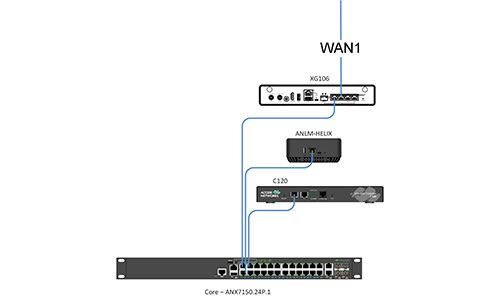
The Core2 system that Access Networks specified for my home utilizes five components: A Sophos XG Firewall, an Access Networks C120 wireless controller, an Access Networks ANX 7150 24-port PoE+ network switch, and an Access Networks Live Monitoring Helix.
Completing the system, Access Networks specified an A610 wireless access point (WAP).
CE Pro Features
- Access Networks Core Systems include the Core2 and Core3 series. The Core2 is a flat or layer-2 network with a single IP scheme. The Core3 series is a multiple-VLAN or layer-3 network with as many as six preconfigured VLANs.
- Core systems feature a Sophos XG Firewall, an Access Networks C120 controller, an Access Networks ANX7150 switch, and the company’s Live Monitoring Helix
- Access Network also provides monitoring services, and it backs its products with four-year hardware warranties
- The company offers network design to support dealers
- MSRPs vary depending upon system configuration
As part of the installation Audio Innovations pulled a number of category cables from the downstairs to the upstairs of my house, as well as cabling from my wife’s “arts and crafts” room, to our basement level laundry room and “music” room. Afterwards, Jon made the physical connections of the five Access Networks components based on a preconfigured system diagram that Access Networks compiles as part of its dealer support services.
Once the physical aspects of the system were made Matt made sure the network was up and running by verifying its configuration.
The total time spent pulling wires, installing the components, verifying and commissioning the Core2 system for my retrofit installation was approximately a day.
Performance and Final Thoughts
Just to provide more transparency, Jon and Matt recommended the Access Networks system to support the installation of a Crestron Home system.
Jon felt that while my network was sufficient, it would not reliably support Crestron Home’s full capabilities. Not wanting to risk reliability issues, he stated that while some network products claim certain performance parameters, those attributes are based on superficial specifications.
I think there’s only one choice an integrator can make right now to fully realize their clients present and future needs. That network partner is Access Networks.
Going with Jon and Matt’s recommendations, which were based on their years of experience in the field, I have not for one second second-guessed their decision.
To provide some performance numbers and to elaborate on the system the Core2 replaced. I had a wireless router that was feeding network switches in my wife’s “arts and crafts” room, as well as our home’s “music room,” and two switches in the kitchen. My kitchen has a storage space above the fridge, which housed my whole-house audio amplifier and Sonos Connect, so this location had a switch and my kitchen has a switch that supports an Apple TV and a Dish Joey set-top box (STB).
On average, my previous network delivered network speeds ranging from 50Mbps to 80Mbps with ping response times of approximately 15ms to 25ms.
The Core2 system through Access Networks’ system design, components and configuration consistently delivers speeds of 295Mbps to 300Mbps and ping response times 12ms to 15ms.
The previous and Access Networks systems both deliver 12Mbps of upload speed.
Having an older service plan from my service provider Comcast, I pay for 300Mbps, so for the first time since I’ve had this approximately 15-year-old plan I am getting what I am paying for in terms of Internet speeds.
I honestly can’t say how happy I am since Jon and Matt first ran through the system and its capabilities with me, which include how well the system’s wireless covers my home without drop offs in speed or reliability.
Some of the things I’ve been able to do is setup an Apple TV outdoors to feed a Seura Shade 2 outdoor 4K TV with content; the system has simultaneously supported both my kids’ remote learning sessions and my Zoom calls. My wife hasn’t said to me she can’t get Internet from our deck, and the Crestron Home system has instantly responded while issuing commands from the companion app, remote control and touchscreen.
Smaller details that may be hard to quantify I think are benefitting from the Access Networks Core2 system too.
For example, over Labor Day weekend, we made the in-app purchase of Disney+’s “Mulan” movie. Having Sony’s brand new VPL-VW915ES projector in my home for another review, I think the Access Networks system helped me fully realize the Disney’s 4K with Dolby Atmos and Dolby Vision stream. The movie looked unbelievable with the Sony projector and I fully believe some of that excellent picture was due to the Core2 system’s ability to support faster, more consistent streaming bit rates.
Another part of the system that’s come in handy is the guest network that Matt created for me. Having a small family gathering (we complied to local COVID rules) I was able to put family members who asked for Internet access onto the guest network to minimize the traffic on our network.
I think the biggest complement I can say about the Core2 system is the fact that I am no longer checking the system to make sure it’s Okay. A network is an absolute, must-have solution in a home, but not all networks are created the same.
Access Networks’ Core2 system has instantly become the bedrock of technology in my home. Out of curiosity when I do check the network just to celebrate in the giddiness of having an Access Networks Core system, I find it consistently delivering similar numbers to the figures I stated earlier.
In a way kind of pains me to say this as an “AV guy” at heart, but the single most important purchase in today’s smart home world is a home network. As much as I love audio and cool projectors like the Sony I mentioned, it is easy to see that in today’s world it comes down to the fact that because not all network systems are created equal, choosing the right network partner is the most important thing integrators can do for their clients.
Based on my experience with various network products at a range of levels from retail to custom installation, I think there’s only one choice an integrator can make right now to fully realize their clients present and future needs. That network partner is Access Networks.
CE Pro Verdict
Pros:
- Access Networks ships its Core Systems preconfigured for each individual installation
- Access Networks support aids dealers in the event of a setup or configuration issue
- Core systems maximize homeowners’ Internet plans to reliably deliver the speeds they are paying for with their respective service providers
Cons:
- There is no “con” with Access Networks. A Ferrari costs more than a Kia for a reason. Access Networks requires a bigger investment than a standard ISP router or big-box system of routers and network extenders, but its systems are worth the long-term investment.