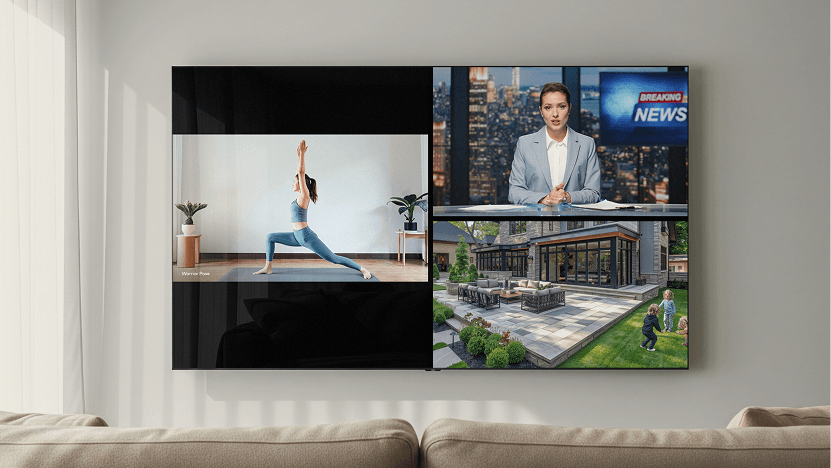
Crestron has released Crestron Home OS 4.12, adding native Multiview capabilities that allow homeowners to display multiple video sources simultaneously on a single screen, according to a Crestron blog post detailing the update.
Powered by Crestron’s DM NVX AV-over-IP platform, Multiview supports picture-in-picture, side-by-side and quad-view layouts. Crestron says the system can accommodate up to six sources in fixed layouts and as many as 18 compositions, with the DM NVX decoder dynamically arranging sources into presets that can be recalled from the Crestron Home interface.
The update brings a feature previously introduced for the broader DM NVX platform directly into Crestron Home OS.
“Dealers and their clients have been asking for this feature,” says Michael Short, Crestron VP of marketing operations and residential. “There were ways to achieve this, but they usually required extra hardware — such as multiple displays or processors — or an intensive custom programmed job to yield the same result as advanced and elegant as this.”
With OS 4.12, Crestron says integrators can configure Multiview through Crestron Configure Pro without custom programming.
Multiview Targets Sports, Security and Everyday Viewing
Crestron is positioning sports viewing as one of the primary applications for Multiview. In one example provided by the company, a homeowner could create a four-source preset showing multiple games alongside commentary or other sports programming and recall the configuration with a single command.
“Suppose a client wants to set a scene for a big NFL weekend,” Short says. “They can choose their preferences and layouts with, say, four different feeds: a couple of broadcast games, a commentary channel, a fantasy football show, what have you. Once that scene’s set, it’s a simple matter to call up that layout with a single touch.
“One tap, and you’re ready for prime time.”
Crestron says users can also switch audio among the sources displayed on screen, selecting which video feed supplies the active audio.
The company also points to security and monitoring as potential applications. In one example cited by Crestron, a homeowner watching a movie could use picture-in-picture to view an exterior security camera after an outdoor occupancy sensor is triggered.
Because Multiview runs on the DM NVX AV-over-IP platform, Crestron says installations can scale by adding encoders and decoders based on what the network can support.
“This is native to Crestron Home OS, which makes deployment a snap,” Short says. “It’s another illustration of the broad, robust ways we’re revamping video offerings in the platform.”
DM NVX Hardware Powers Multiview
Crestron’s DM-NVX-384 and residential-focused DM-NVX-385 encoder/decoders provide the hardware foundation for Multiview.
According to Crestron, the DM-NVX-384 can operate as either a transmitter or receiver and includes features such as a scaling HDMI output, video wall processing, an analog audio input or output, native AES67 transmit and receive capabilities, surround sound audio, copper and fiber-optic Ethernet connectivity, USB 2.0 and KVM integration.
Crestron says the DM-NVX-385 builds on the platform with capabilities aimed at residential AV installations, including 7.1 surround sound with downmixing, Dolby Atmos MAT 2.0 format support, DTS codec support and simultaneous stereo and multichannel distribution, including height channels.
Crestron Home OS 4.12 Adds More Device Support
Multiview headlines the 4.12 release, but Crestron is also adding support for several other products and capabilities.
The update adds support for the upcoming Cameo Dual Dimmer upon shipping. According to Crestron, the CM2-DIM2EX provides two independent channels within a single-gang box, giving integrators another option for rooms with multiple lighting loads without adding additional wall devices.
OS 4.12 will also support Crestron’s 15-inch 80 Series touch screens upon shipping, expanding a lineup that previously included 8- and 10-inch models.
The release additionally adds support for Horizontal Sheer Tilt Limit firmware for Crestron Horizontal Sheer Shades.
Crestron says all of the new capabilities can be configured through Configure Pro, the company’s newer configuration environment for Crestron Home OS.
“We’ve shortened and simplified the process for dealers,” Short says. “It’s easier than ever to unlock and configure every benefit and solution offered in Crestron Home OS.”
“Simply put, dealers really don’t need to do anything after this update. It just works,” he adds.