
The other day I was going down a rabbit hole on X talking Remote Viewing (the psychic kind). I had seen things about this before, but I’m not one to believe things offhand, so I decided to “do my own research” and find the “Remote Viewing Training Manual” people were discussing. Lo and behold I get taken to CIA.gov, and there was a training manual for this. Who knew? Upon reading it, though, I couldn’t help but see correlations between how they described remote viewing and wireless networking. It was quite incredible. Some of the figures could have been taken right out of a slide deck. Let me explain.
How a CIA Manual on Remote Viewing Pertains to Wireless Networking
If you’ve ever been called by a client and said their “network is slow,” you roll a truck and pull out a handy dandy spectrum analyzer and signal looks fine, yet everything seems extremely slow. You’ve run speed tests from the switches all the way upstream to the router and those all check out, yet Wi-Fi speeds are still crawling.
Many times, that’s not caused by raw signal strength; it’s the noise floor, it’s interference, it’s contention. The channel is busy. In other words, it’s not signal strength that’s the problem, it’s signal to noise ratio (SNR).
A Model for ‘Wireless’ Performance
Early in the report the authors sketch remote viewing as a signal problem. There’s a stream of “data” trying to poke through a higher level “background noise” line. When the noise dips, a “quiet state,” the data becomes accessible. Remember when I said the figures look like they came out of a wireless slide deck? Check out Figure 1 in the document:
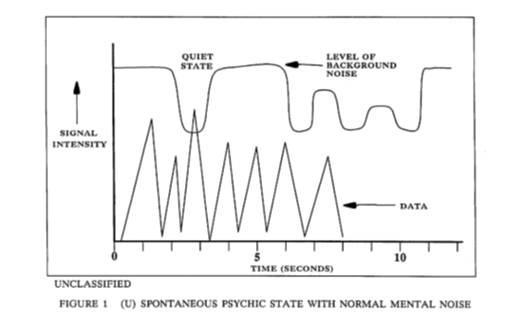
If you replace the words and keep the shape, this is basically how we explain usable Wi-Fi performance. Even with good RSSI, you can get killed by a higher noise floor, interference, or contention.
A clean channel, or even a brief quiet moment, is where you get your best throughput. Think about 6GHz on Wi-Fi 7 or Wi-Fi 6e even, we highly recommend people who live in Manhattan high rises to move to 6GHz so that they can avoid the noisy neighbors, of which they have so many.
6GHz is like an open freeway, for the moment, and has a lot more channels to utilize than 2.4GHz or even 5GHz.
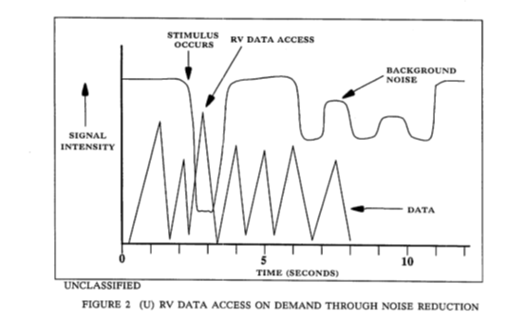
Figure 2 adds a labeled trigger (stimulus occurs) and a labeled window with less noise (RV data access) that opens during a dip in background noise. The framing reads like a bursty capture, like a short favorable channel condition where your link can get a clean run before things get noisy again.
‘Targeting’ Channel Data
One of the two big concepts in the report is “targeting.” This is essentially setting up a specific focus so the viewer can open what the authors describe as a perceptual window or channel to the target. Yes, they used the word “channel.”
If you, like me, do networking for a living, the word channel should bring a smile to your face. I found many similarities in the way they describe how they target the “data.” I suggest you read the manual so you understand where the below comes from, but these are some examples of what they discussed:
- Picking which conversation you actually want to listen to
- Narrowing scope until the irrelevant stuff is “just noise”
- Getting your first clean sample before your brain invents a story
In Wi-Fi this is the difference between staring at overall “internet speed” and drilling down into channel utilization, retry rate, which band a client is using, and whether one specific device is hogging all the airtime. That’s “targeting.” The rest is noise reduction.
In networking terms, we could translate the info as such:
- There is always a baseline noise floor (mental or RF)
- Useful data arrives in bursts, not as a constant clean stream
- Your job is to improve separability; lower noise, reduce self interference, and capture the first clean packet
Troubleshooting ‘Network’ Issues
Later this report turns the concept into a structured procedure. It breaks the process into three phases:
- Access (noise reduction)
- Objectify (data recording)
- Qualify (data interpretation)
Here’s a screenshot:
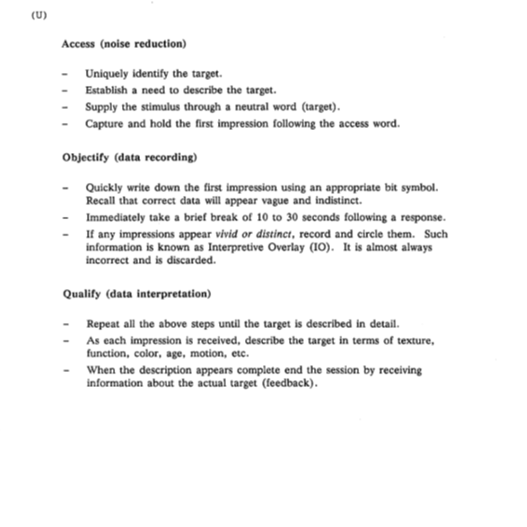 If you swap the vocabulary, that’s basically how good network troubleshooting works:
- Access (noise reduction) – Acquire the link: isolate variables, reduce interference, get to a “quiet” state
- Objectify (data recording) – Capture raw evidence: logs, counters, packet captures, spectrum snapshots
- Qualify (data interpretation) – Decode meaning: map symptoms to causes, validate with repeatable tests
Parallels in ‘Interpretive Overlay’
One of my favorite aspects of this is when they start talking about Interpretive Overlay (IO). Plainly, if an impression feels vivid or distinct, you should flag it and treat it as almost certainly wrong.
I find this happens all the time if I’m looking at a PCAP file in Wireshark. I think I’ve stumbled up on the issue immediately. I see one retransmission and declare that “the ISP is dropping packets” without checking the rest of the capture, then diving in more I find that wasn’t the issue at all.
The checklist also says to take a brief break of 10-30 seconds after a response. In remote viewing framing, it’s to suppress overlay and keep the next impression clean. In networking terms that reads like backoff and reset behavior. Let buffers clear, let the channel settle, avoid self-interference, don’t hammer the “test button” so that you destroy the very thing you’re trying to measure.
Dissecting the ‘Anatomy of Viewing’
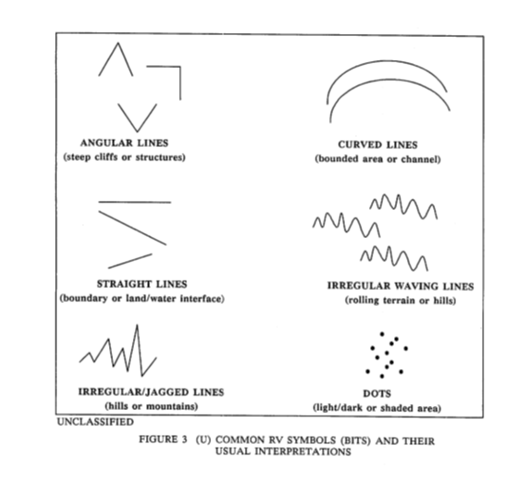
Then we get to another interesting part. A handmade modulation scheme of sorts. The report defines quick symbols as “bits,” yes “bits,” meant to represent common target features such as boundaries, channels, jagged terrain, etc.
In the section called “anatomy of viewing” the report includes sketches, showing how detail builds over multiple passes. One of them explicitly labels “retracing bits” and shows a progression from primary bits to multiple bits to detailed description.
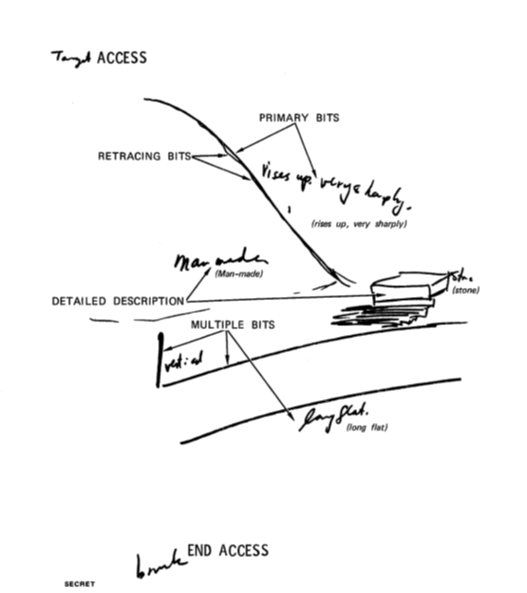
If you want to dive deeper the “access” and “end access” at the bottom is almost like coding something. If we were to write that in code it would be something like <access> and </access>.
If this were a Wi-Fi spec it would look like this:
- Requirement: Receiver MUST operate in a low noise state before attempting decode.
- Recommendation: Receiver SHOULD capture raw artifacts before interpretation.
- Warning: Overly vivid frames MAY represent Interpretive Overlay (IO) and SHOULD be flagged as suspect.
- Timing: After each capture, receiver SHOULD wait 10–30 seconds (backoff) before next attempt.
- Reliability: Multiple passes (retracing) SHOULD be used to improve confidence and reduce errors.
Glossary of Terms
I made a quick table on the terms used in the manual and how it matches with networking terminology.
| Remote viewing term | Networking/comms analogy | Why it matches |
| channel/window opened on demand | Link acquisition / channel access | A gated, time limited opportunity to extract a signal |
| Noise reduction / mental noise | Noise floor / interference | They explicitly draw a background noise line |
| Stimulus (target word) | Trigger / probe / preamble | A short even that starts the access window |
| Bits (symbolic marks) | Bits (as in binary code) | Low bandwidth encoding of “what matters.” |
| Objectify (data recording) | Packet captures / logging | Record raw-ish observations before interpretation |
| Interpretive Overlay | False positives / misclassification | Vivid, overconfident conclusions treated as suspect |
| 10-30 second break | Backoff / guard interval | Reset state to reduce self generated interference |
| Retracing bits | Retransmission | Multiple passes to improve conditions |
Key Takeaways for Integrators
What we as networking pros can take away from this:
- Stop worshipping signal bars. The receiver lives and dies by separability (SNR, interference, airtime)
- Create a quiet state on purpose. Disable one variable at a time and isolate the problem like you’d isolate a noisy mind.
- Capture the first clean impression. Start with raw evidence (counters, logs, packet capture). Don’t jump to conclusions because the story sounds good.
- Assume your first confident answer is IO. If it feels too neat, validate with a second capture or a different tool.
- Work in passes. Coarse to fine. Baseline to targeted capture. Symptom to cause.
Follow-Up
Curious to know what others think of this. Am I reaching too much, or does this look a lot like networking to you as well?
If the CIA took it seriously enough to write this and many other docs on it I found online, then maybe it’s a real thing?
I’d try it but I have enough trouble quietening my mind to be able to go to sleep, let alone reduce the noise so that I can travel through great distances with my mind.
Here’s the site address where I found the manual in case you’re interested: https://www.cia.gov/readingroom/docs/CIA-RDP96-00789R002200070001-0.pdf
Bjørn Jensen is the CEO/Founder of WhyReboot.





